What AI Object Masking Means for Brand Video Production
A practical look at using AI-assisted masking to adapt real footage, build social variations and preserve production craft.
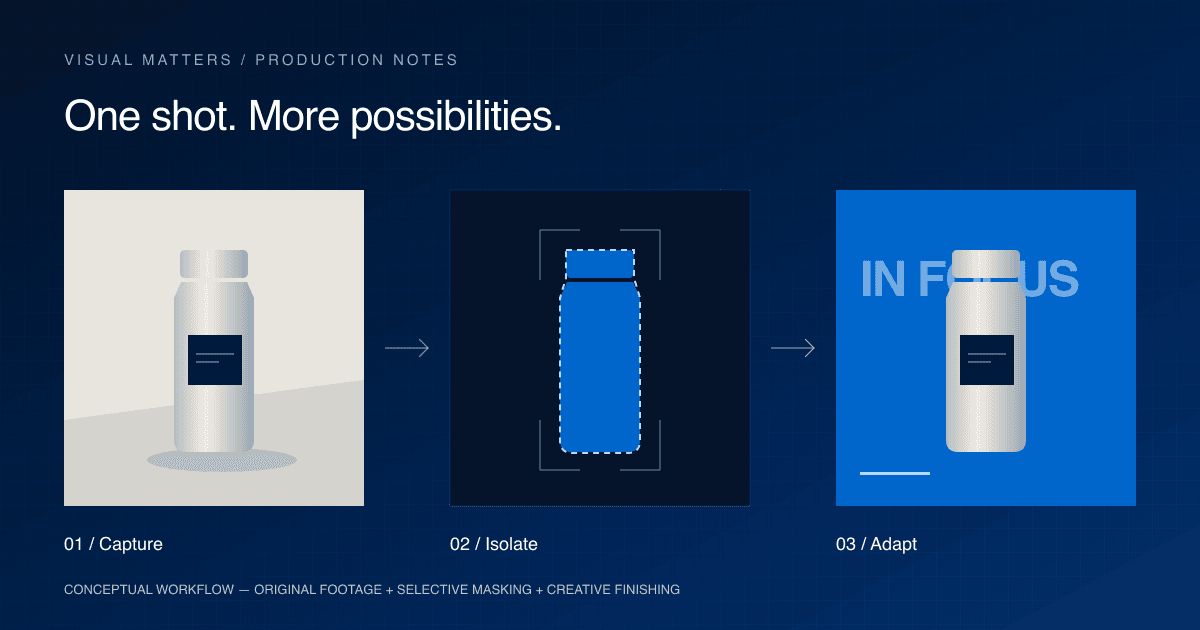
AI can now help an editor separate a person or product from the rest of a shot without drawing every edge by hand. Adobe's September 2026 Premiere release adds further refinements to Object Mask, which first shipped in version 26.0 in January. For marketing teams, the useful question is what that makes possible with footage they already have.
A filmed product could receive a targeted colour adjustment. A presenter could sit in front of campaign typography. A social cutdown could use a different visual emphasis while retaining the original performance. These are practical editing opportunities, provided the footage supports them. They also change the brief: teams should decide which elements need to remain flexible before the camera rolls.
What has changed
A mask tells editing software which part of an image an effect should apply to. Tracking keeps that selection aligned as the subject moves. Traditionally, difficult shots can require extensive manual adjustment. AI object masking gives the editor an automatic starting selection that can then be tracked and refined.
Adobe's January release announcement introduced Object Mask as part of the available Premiere 26.0 release. Its June update described further refinements, including softer masks and regeneration after relinking media. This is an editing capability already released, rather than a concept demonstrated only in a promotional video.
Adobe's documentation updated on 9 September describes expanded object detection in version 26.5, alongside Sharp and Smooth quality modes. It also notes hardware-dependent differences: some systems fall back to an earlier detection model. A production team should confirm the installed version and test its own footage before promising a particular result.
Object masking is distinct from generating a new image. It selects areas within captured footage; it does not supply a missing camera angle, recreate an unseen product surface, or direct a better performance.
Why it matters for brands
Our practical assessment is that easier selection makes some adaptations more feasible within an existing edit. That could mean testing a graphic treatment, adjusting the background separately from the subject, or building a small family of related social assets.
It does not automatically make a campaign cheaper. Selection is only one task. Refining edges, designing the treatment, checking brand accuracy and reviewing each export still require time. Ask for an estimate based on representative shots, including cleanup and approval rounds, rather than a blanket percentage saving attributed to AI.
For a regional campaign, the value may be flexibility. A Hong Kong master edit might need different copy, offers and end cards for Singapore or Thailand. Keeping these elements editable gives local teams room to adapt without rebuilding the whole film. Masking can support that design approach, but it cannot make the translation or decide whether a message is appropriate for a market.
Where it works well
Consider a hypothetical retail launch. The team films a product demonstration and wants three opening treatments: a benefit headline, a detail-led introduction and a promotional message. An isolated subject can help the designer layer typography around the action. The footage stays consistent while the opening changes. Each version still needs a clear reason to exist.
For hospitality content, selective adjustments might help direct attention towards a plated dish or a bartender within a busy scene. The treatment should preserve the real appearance of the food, venue and service. Start with the desired viewing experience, then decide whether masking improves it.
For a presenter-led social video, placing graphics behind the speaker can introduce depth. However, a clever effect is not useful if it makes the message harder to read. Review the result at phone size, with captions and the intended platform's interface in mind.
Where traditional production still matters
A usable mask begins with usable footage. Lighting, separation from the background, camera movement and the way a subject crosses other objects all affect how much finishing work a shot may need. An editor should inspect movement across the complete shot, not judge the mask from a single attractive frame.
Fine hair, reflective packaging, transparent materials and motion blur deserve particular attention during testing. The right response may be refinement, a different treatment or a different shot. An automatic selection should never be treated as final approval.
Product accuracy also remains a production responsibility. A colour adjustment must not misrepresent a garment, cosmetic shade or pack. Strong lighting and controlled photography are still preferable to relying on post-production to repair avoidable problems. Interviews, human expression and convincing physical interaction continue to depend on direction and capture.
Build a hybrid workflow around the deliverables
Begin with a simple delivery plan: which audiences, markets, formats and messages need distinct versions? Identify the parts that should stay fixed, such as the product demonstration, and those that may change, such as the opening line or end card.
Before committing the shoot, test a short representative clip. Ask the editor to attempt the intended mask, apply the actual graphic treatment and export the planned format. That small test is more informative than a tool demo using unrelated footage.
During production, capture the performance and product detail properly, allow space for graphics, and shoot clean backgrounds where the treatment calls for them. In post, combine selective AI assistance with editing, colour, sound and manual finishing. Approve the visual treatment before multiplying it into market versions.
Finally, review every delivered variation. Check edges in motion, product colour, text collisions, translated copy and the end card. If the assets will support paid creative testing, give each version a clear label so the marketing team can connect feedback to the treatment it received.
The Visual Matters perspective
At Visual Matters, we see AI as part of the production toolkit rather than a replacement for production itself. Our combination of commercial video, photography, social content and AI-assisted visual production is relevant when a brief needs both carefully captured material and flexible adaptations.
The useful starting point is the campaign's output requirements. From there, we can discuss where traditional production, creative adaptation and post-production should carry the work. Explore our production services for the broader picture.
If your team is planning content for Hong Kong or APAC and wants to explore a hybrid approach, speak with the Visual Matters team about the footage, formats and variations your campaign needs.